Parts of a CPU and Their Functions
By Marlo Strydom · Published
A processor is much easier to understand once you stop picturing it as one solid chip. Inside that small square, separate units each handle one job, and layers of fast memory keep them fed with data.
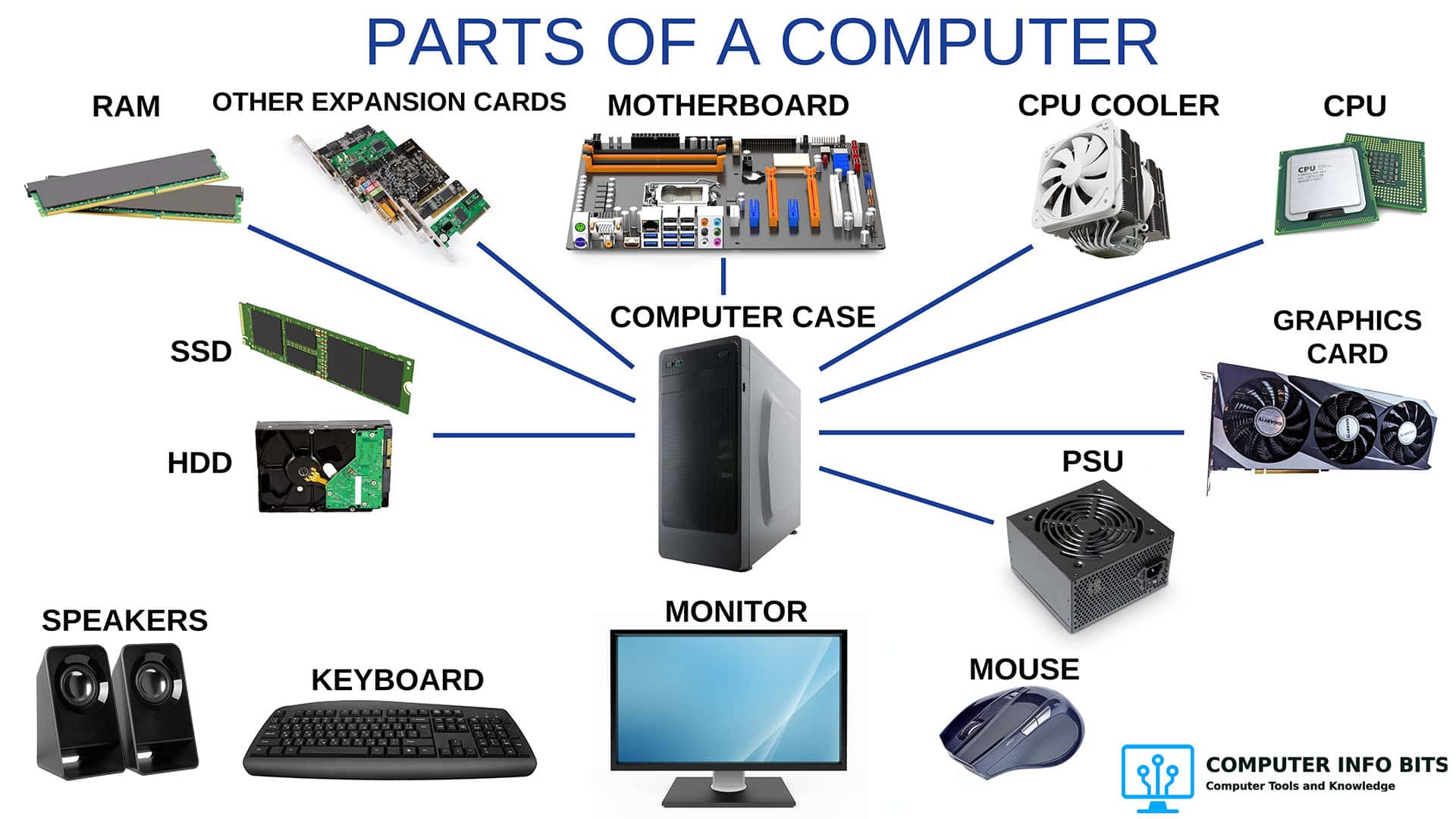
Here is what each part does, starting deep inside the core and working out to the chip you can hold. If you meant the whole tower, which some people call the CPU, see the main parts of a computer instead.
Each Part at a Glance
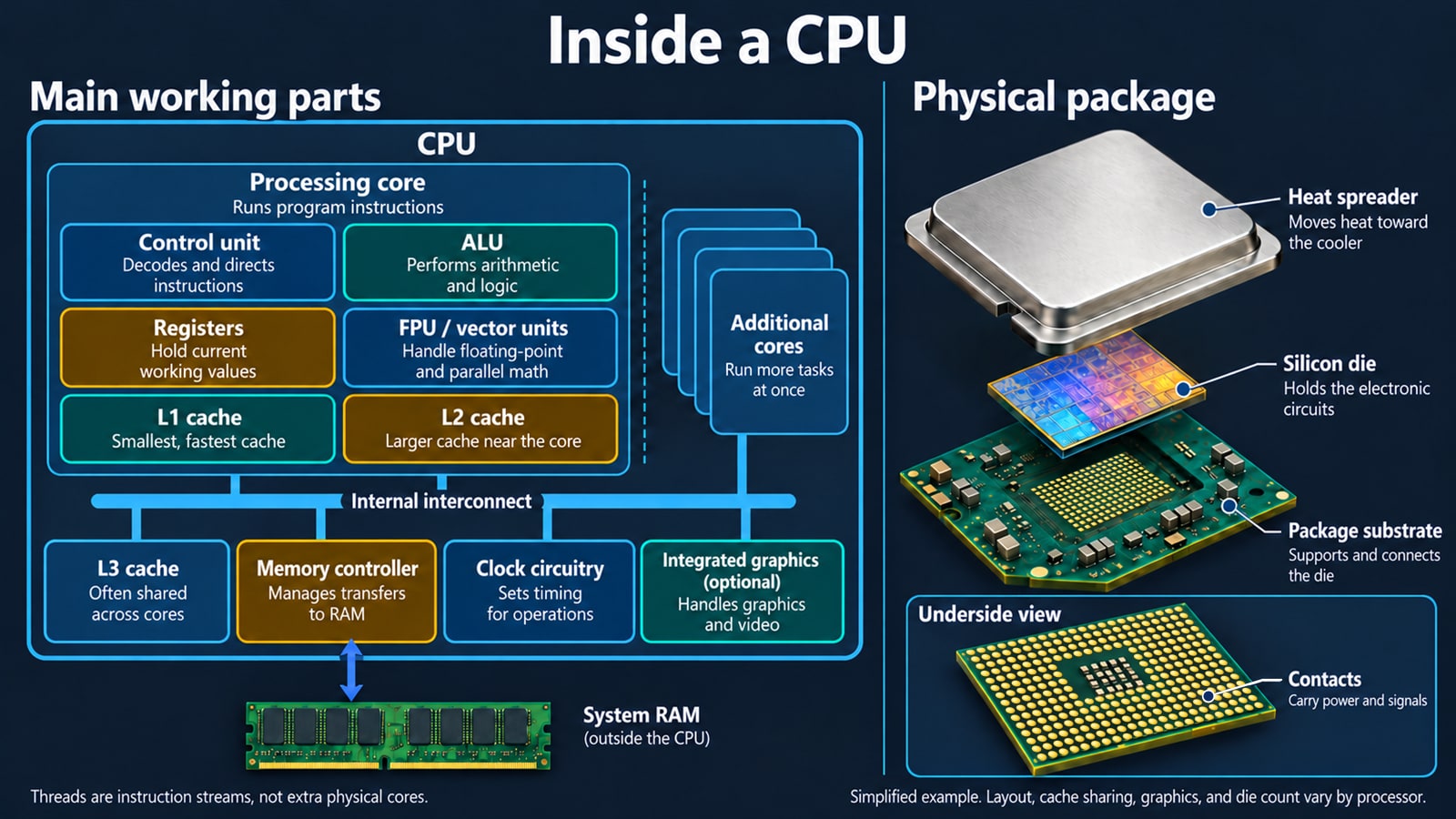
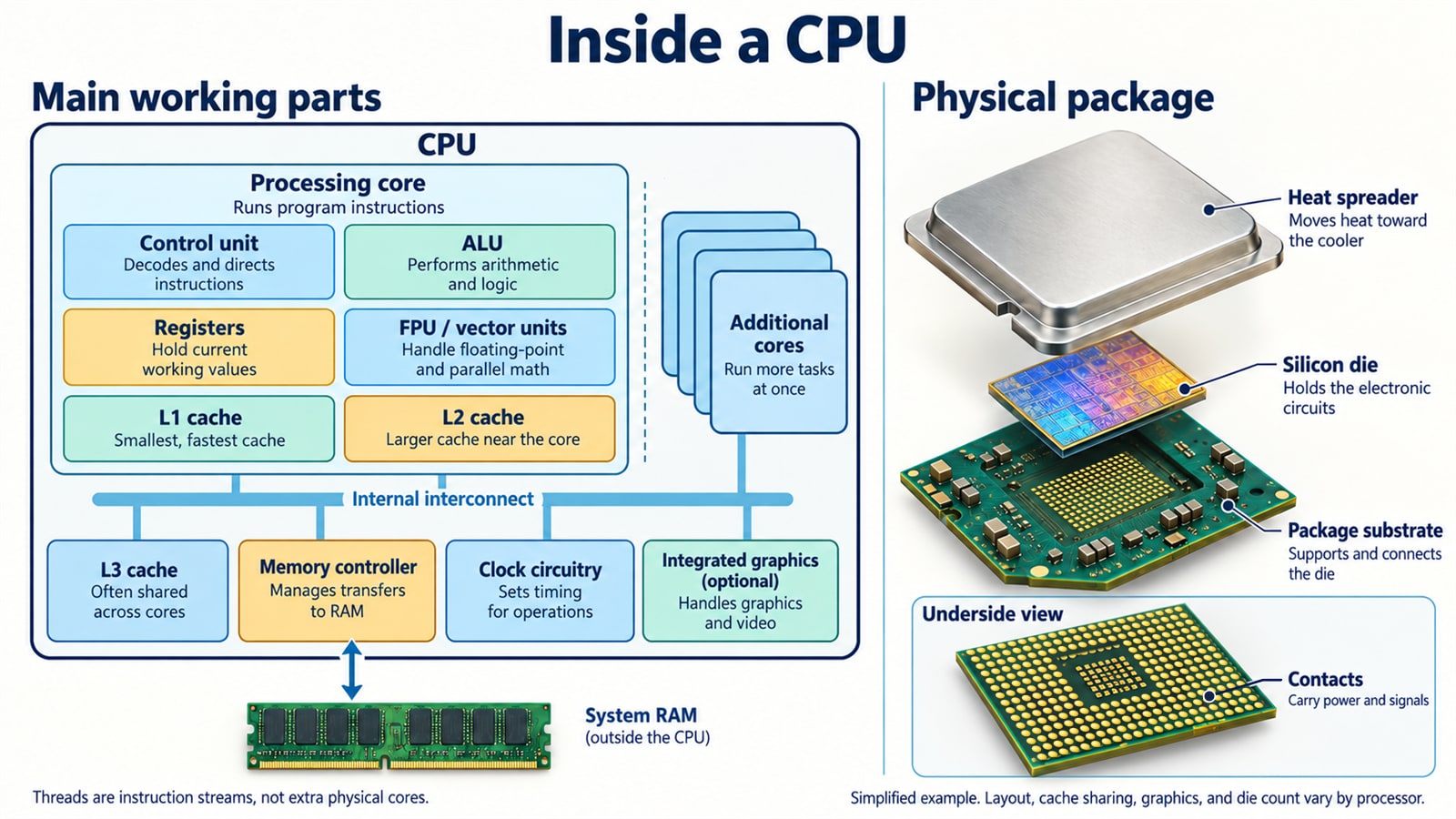
Most classes start with three parts: the control unit, the ALU, and the registers, which some books call the memory unit. Arm's list of a CPU's main components adds cache and the clock, and a desktop chip adds a few more.
Control Unit
The control unit is the part that reads each instruction and works out what it is asking for. It does no math itself. Its job is to fetch the next instruction, decode it into steps the hardware understands, then switch on whichever units are needed and send the data to them.
It also keeps track of where the program is up to, so the processor knows which instruction comes next. When a program branches, such as when an if statement goes one way instead of another, the control unit is what redirects the flow.
Arithmetic Logic Unit
The arithmetic logic unit, or ALU, is where the actual work happens. Arithmetic covers adding, subtracting, multiplying, and dividing. Logic covers true or false tests, such as checking whether two values match or which one is larger.
Those simple steps are enough to run every program on your computer. Sorting a list, resizing an image, and checking a password all come down to long chains of math and comparisons.
Worth knowing: Modern cores also have a floating point unit for decimal numbers and vector units that run one step on a whole row of values at once. Intel's vectorization guide shows how one vector instruction can replace a long run of single ones.
Registers
Registers are tiny slots of storage built right into the core. They hold the few values the processor is using at this exact moment. They are the fastest storage in the whole computer because they sit right beside the units that use them.
Each core has only a small number of them, and each one holds a small amount of data. Anything that won't fit has to come from cache or memory, which always takes longer.
Cache Memory
Cache is fast memory that sits between the registers and system RAM. The processor keeps recently used instructions and data here, because a program that just used something will likely need it again soon. Each level of cache is larger but slower than the one before it.
| Level | Where It Sits | What It Holds |
|---|---|---|
| L1 | Inside each core, split between instructions and data | The smallest and fastest pool, checked first on every access. |
| L2 | Also private to each core, one step further out | A larger backup for data that no longer fits in L1. |
| L3 | Shared across all the cores on the chip | The largest pool, and the last stop before a request goes to RAM. |
When the data is already in cache, work carries on with almost no delay. When it isn't, the request goes out to RAM and the core may sit idle while it waits. That's why cache size sits next to core count and clock speed on spec pages like Intel's Core i5-14400 listing.
The Clock
The clock is a signal that pulses at a steady rate and keeps every part of the processor working in step. Each pulse marks the moment the next stage of work can begin. Clock speed is measured in gigahertz, and one gigahertz is a billion pulses per second.
A higher clock speed means more steps per second, but only compare it between similar chips. A newer core that does more work per pulse can beat an older one with a higher number. Processors also raise and lower their own speed as conditions allow, which Intel describes for its boost behavior and AMD covers in its Precision Boost documentation.
Heat sets the ceiling on all of this. Once a chip reaches its temperature limit, it lowers its own clock to protect itself, which Intel confirms when it notes that thermal throttling reduces processor clock speed.
Memory Controller
The memory controller is the part of the CPU that talks to the system memory on the motherboard. It sends the read and write requests, keeps the timing the memory sticks need, and hands the results back to the core.
Because the controller is part of the processor, the CPU decides which memory types and speeds a system can use. Intel lists them in the memory section of each chip's spec page, such as the Core i9-14900 listing. Memory usually runs below its rated speed until a stored profile is switched on, such as the Extreme Memory Profile settings in most desktop firmware.
To check yours, our free RAM Optimizer shows each stick's speed and flags any kit running below its rating. Where the sticks sit matters too, so check which RAM slots to use for dual channel.
Cores and Threads
A core is a complete copy of everything described so far: its own control unit, ALU, registers, and L1 and L2 cache. A processor with eight cores has eight of these working side by side, so the computer can run several demanding programs at once without them fighting over the same hardware.
Threads are different from cores. Many processors let one core run two threads, so it can work on one while the other waits for data. Intel calls this Hyper-Threading, where one physical core works like two logical ones.
That is why Windows may show twice as many logical processors as the chip has cores. Microsoft explains how to find the core count, and the Performance tab of Task Manager shows both numbers together.
More cores don't help every task. A program written to run as one sequence uses a single core no matter how many there are, which is why some older software feels no faster on a big processor. If you're weighing a CPU against a graphics card, the PC bottleneck calculator shows which one limits your setup.
Integrated Graphics
Many desktop and nearly all laptop processors include a graphics unit on the same piece of silicon. It drives the display, handles everyday visual work, and decodes video so the main cores don't have to. It has no memory of its own, and Intel notes that integrated graphics uses system memory instead.
This is the part that lets a PC show a picture with no graphics card fitted, which helps when testing a build or checking a faulty card. Not every processor has one, so a chip without it needs a card installed before it will show anything on screen.
The Physical Package
Everything above lives on a single piece of silicon called the die. The die is surprisingly small, and the square you hold in your hand is mostly packaging built around it.
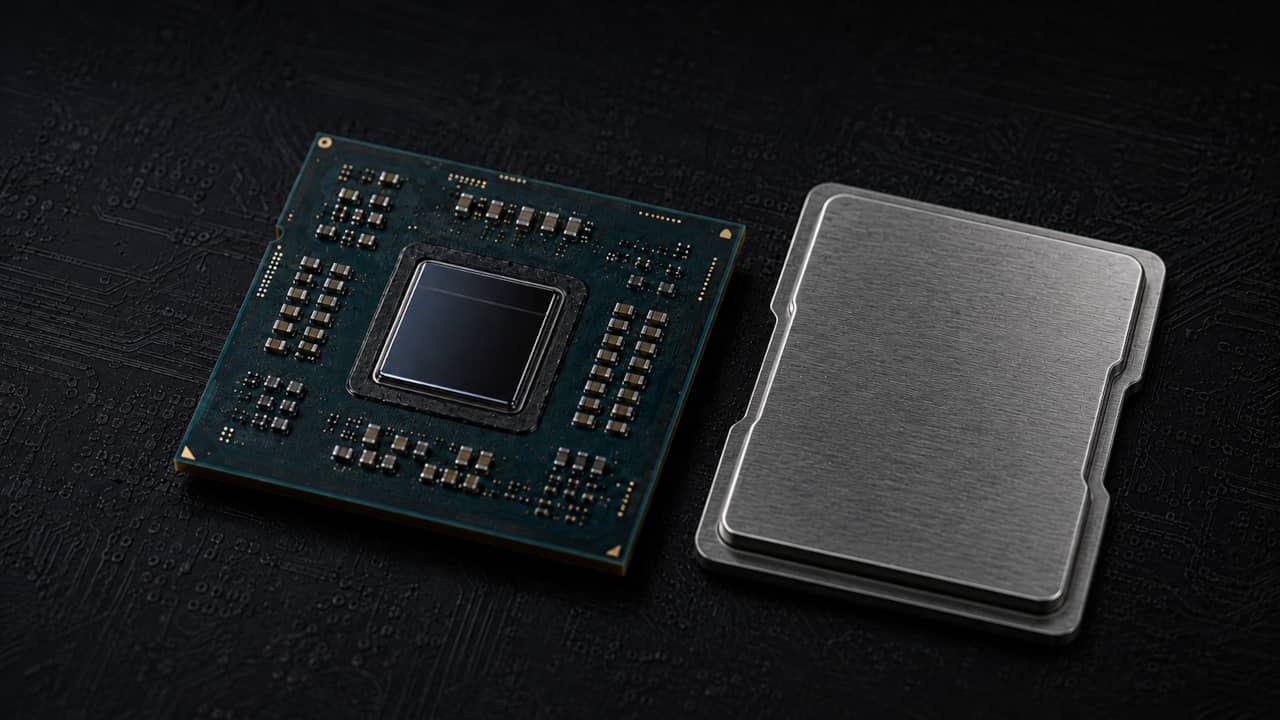
- Silicon die: The chip itself, holding the cores, cache, memory controller, and graphics unit.
- Package substrate: The green board the die sits on, carrying its connections out to the edges.
- Integrated heat spreader: The metal lid that spreads heat from the die across a wider surface for the cooler to collect.
- Contacts: The pads or pins underneath that meet the CPU socket on the motherboard.
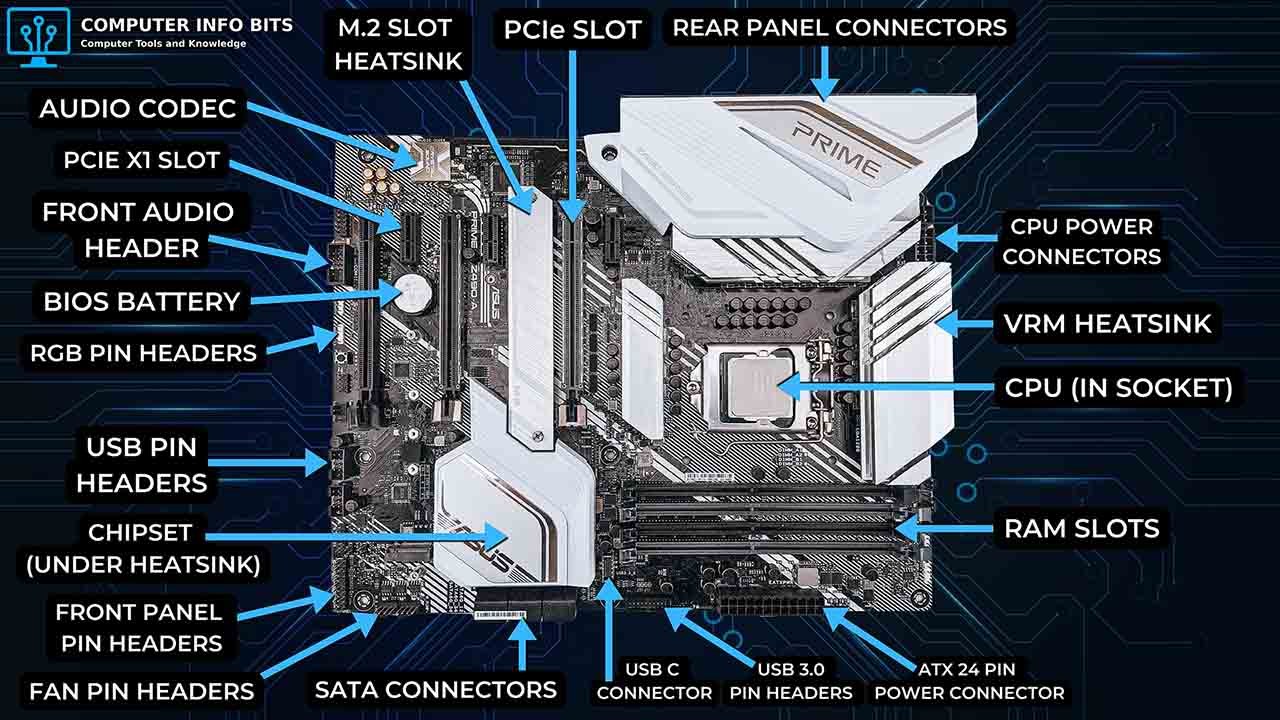
Those contacts are why processors need careful handling. Intel's processor installation guide warns against touching them and calls for antistatic protection, because bent or dirty contacts can stop a chip from starting. The socket also decides which processors a board accepts, as our guide to motherboard parts explains.
How the Parts Work Together
The central processing unit runs the instructions that make up every program on the computer. Each unit above is nearly useless alone, so they work as a team on one simple loop, repeated for every instruction:
- The control unit fetches the next instruction, taking it from L1 cache when it is already there.
- It decodes that instruction into the specific steps the hardware can carry out.
- The values needed are loaded into registers, from cache or from RAM through the memory controller.
- The ALU carries out the math or comparison the instruction asked for.
- The result is written back to a register, then out to cache and memory as needed.
- The clock ticks and the next instruction begins.
Real processors overlap these steps so several instructions are in progress at once, and they reorder work to avoid waiting. Every instruction still goes through the same order. That shared loop is also why a fault in one unit shows up as general instability rather than one broken feature.
Related Posts