
Skip to content

Email backup software

Free Thunderbird Backup and Restore Tool for Windows

Thunderbird Backup saves a complete copy of your Mozilla Thunderbird mail profile into a single zip file, and restores it later on the same computer or a new one. Your messages, accounts, address books, filters, and saved passwords all come back automatically.

Free, no trial or paywall Single EXE, no install needed Backs up mail, settings, and saved passwords Restore never overwrites existing mail Works on a brand-new PC
Download Thunderbird Backup

Free. No ads, no trial, no paywall, no feature locks.

The download is a single standalone EXE. There is nothing to install, so you can run it from anywhere, including a USB drive.

Version 1.0.0 · 49 MB · Windows 10 / 11 (64-bit)

Windows may show a SmartScreen prompt on the download. Click More info, then Run anyway.

Download the User Guide (plain-text guide covering backup, restore, and troubleshooting)

Thunderbird Backup is an independent tool from Computer Info Bits. It is not affiliated with or endorsed by the Mozilla Foundation. Mozilla Thunderbird is a trademark of the Mozilla Foundation.

Platform

Windows 10 / 11

Delivery

Standalone EXE

Backup output

Zip archive

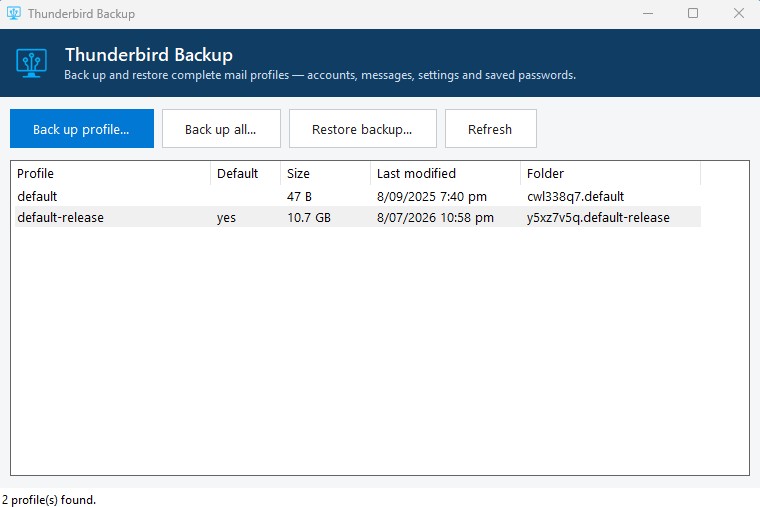
Thunderbird Backup main window listing Thunderbird mail profiles with their size and last modified date, alongside buttons to back up or restore a profile
The main window lists every Thunderbird profile for the current Windows user, marks the default, and shows each profile’s size, with backup and restore one click away.
Share this software:

Your whole mail profile in one zip file

Thunderbird Backup is a free standalone Windows application that saves a complete copy of your Mozilla Thunderbird mail profile into a single zip file, and restores that copy later on the same computer or a new one, without ever overwriting your existing mail.

A Thunderbird profile contains everything that makes Thunderbird yours: your email accounts and their settings, all downloaded messages and local folders, your address books, message filters and tags, saved passwords, and calendars if you use them. Because the whole profile is copied, nothing needs to be reconfigured after a restore.

What the tool does

Every part of the program is aimed at making backup and restore safe and hard to get wrong.

Profile Detection

Lists every Thunderbird profile for the current Windows user, marks the one Thunderbird opens by default, and measures each profile's size in the background.

One-Click Profile Backup

Saves the selected profile into a single zip file named with the profile and today's date, so backups stay easy to identify later.

Back Up All Profiles

Backs up every profile in one run, each as its own zip file, which is the safest choice when you are not sure which profile you need.

Safe Restore

Unpacks a backup into a brand-new profile folder alongside anything already there, so restoring never deletes or overwrites your existing mail.

Default Profile Switch

Can make the restored profile the one Thunderbird opens, and saves a safety copy of Thunderbird's profile list before changing it.

Locked-File Check

Warns you when Thunderbird is still running, so you do not end up with an incomplete backup from locked files.

Where Thunderbird Backup fits best

Moving to a new computer

Back up on the old PC, install Thunderbird on the new one, restore the zip, and your mail, accounts, and passwords come across in one step.

Reinstalling Windows

Take a backup before wiping the machine, then restore it after the reinstall so Thunderbird picks up exactly where it left off.

Regular safety backups

Keep dated zip copies of your mail profile so a failed drive or a bad sync never costs you years of email.

Keeping an offsite copy

Store a backup on an external drive or private cloud folder, so your mail survives even if the computer itself fails.

Built to be safe by default

Restoring never deletes or overwrites your existing mail. The backup is unpacked into a brand-new profile folder alongside anything already there, and you decide whether the restored profile becomes the one Thunderbird opens.

Before the program touches Thunderbird’s profile list, it saves a safety copy of that file first, so the previous setup can always be recovered. Backups themselves only read your profile and change nothing.

One thing to keep in mind: because the whole profile is copied, your backup zip contains your saved email passwords. Store backups on a drive or cloud folder that only you can access, and delete old backups you no longer need.

Thunderbird Backup is built and maintained by Computer Info Bits, the same team behind the guides, calculators, and PC Reporter on this site.

Frequently asked questions

What does Thunderbird Backup save?

It copies your whole Thunderbird profile: email accounts and their settings, all downloaded messages and local folders, address books, message filters and tags, saved passwords, and calendars if you use them.

Are my saved passwords included?

Yes. Because the whole profile is copied, your saved passwords are in every backup and come back automatically when you restore. That also means anyone with the backup file can read your mail, so store backups somewhere only you can access.

Is the software really free?

Yes, it is genuinely free. There are no ads, no trial period, no paywall, and no feature unlocks. The download is the full application.

Does restoring overwrite my existing mail?

No. Restoring unpacks the backup into a brand-new profile folder alongside anything already there. Your current profile stays untouched, and you choose whether the restored one becomes the profile Thunderbird opens.

Can I restore on a computer that has never run Thunderbird?

Yes. Install Thunderbird first, run a restore, answer Yes when asked to make it the default profile, and Thunderbird opens your restored mail on its first start.

Do I need to install anything?

No. The program is a single EXE file. Save it anywhere you like, including a USB drive, and double-click it to run.

Why do I need to close Thunderbird first?

Thunderbird locks some of its files while it is running, and locked files cannot be copied. The program checks for this and reminds you if Thunderbird is still open.

Is this an official Mozilla tool?

No. Thunderbird Backup is an independent tool developed by Computer Info Bits Limited. It is not affiliated with or endorsed by the Mozilla Foundation. Mozilla Thunderbird is a trademark of the Mozilla Foundation.

Found a bug or want a specific feature?

Use the contact page to report a bug or request a backup or restore improvement.

Contact Us